


It is Sunday night and you are typing next week's roster into the group chat. Monday morning someone swaps with someone else. Wednesday a person you rostered is on MC.
By Friday the message everyone is scrolling back to is three corrections out of date, and at least one person is working off the wrong version of it.
That part is annoying. The part that actually costs you is four weeks later.
Month end arrives, and you have to work out what you owe five people. There is no record of who was rostered, because the roster was a chat message that has since been overwritten. There is no record of who turned up, because nobody ever wrote that down.
So you reconstruct it — from memory, from the booking calendar, from what people tell you. And then someone says "I stayed back late twice that week", and you cannot prove they did not, and they cannot prove they did, and one of you gives in.
That conversation is not really about honesty. Almost everyone in it is telling the truth as they remember it. It is about the fact that nothing was recorded at the time, so four weeks later two honest people have two different memories and no way to settle it.
Here is the system we recommend, in the order it actually fixes things.
1. Give the roster one home and one version
The group chat is not a bad roster because it is WhatsApp. It is a bad roster because it has no current version. Every correction is a new message, and the newest message is not necessarily the complete picture — it is usually just the last thing that changed.
What you want instead is one place where the answer to "who is working Thursday?" is whatever is on the screen right now. Not the newest message about Thursday. Thursday itself.
The test is simple: if a team member asks you what they are working next week, can you point at something instead of scrolling? If the answer is scrolling, the roster has no home.
2. Make the hours that repeat actually repeat
Look at last week's roster and this week's. For most salons and clinics, 70 to 80% of it is identical. The same three people work the same core hours; what changes is cover for the one person who is off, and the weekend.
If you are retyping the identical 80% every Sunday, you are doing an hour of work a week to produce something you already had.
Whatever you use, it needs to let you build a week once and then reuse it — copy last week forward, or save a good week as a pattern and apply it.
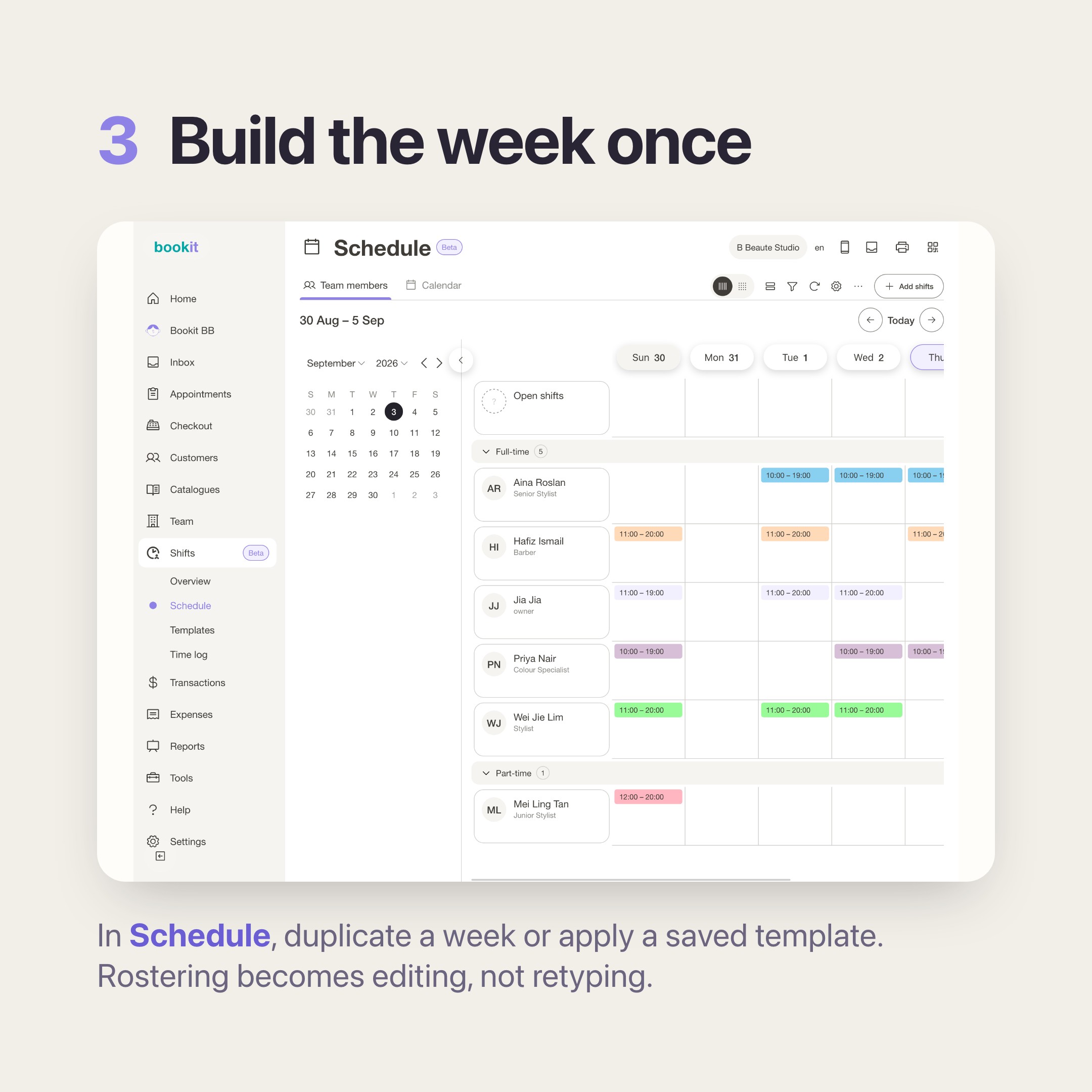
This is where bookit's Shifts comes in, and it is the least glamorous part of it. In Shifts, then Schedule, you build the week on a grid of team members against days.
To fill the next one, you duplicate a day or a range, or you apply a shift template you saved earlier. If someone has usual weekly hours, you set those once on their team member profile as a default shift schedule, and applying a template fills their calendar for you.
The roster stops being a weekly writing task and becomes a weekly editing task. That is a much smaller job.
3. Record the turning up, not just the rostering
Here is the gap that causes the month-end argument. A roster records your intention. It says Aina was meant to work 10 to 6 on Thursday. It does not say whether she did.
For most merchants we talk to, nothing records that at all. There was never a punch card, never a sign-in sheet. The gap is invisible right up until the moment it turns into a dispute about hours, and then it is the whole problem.
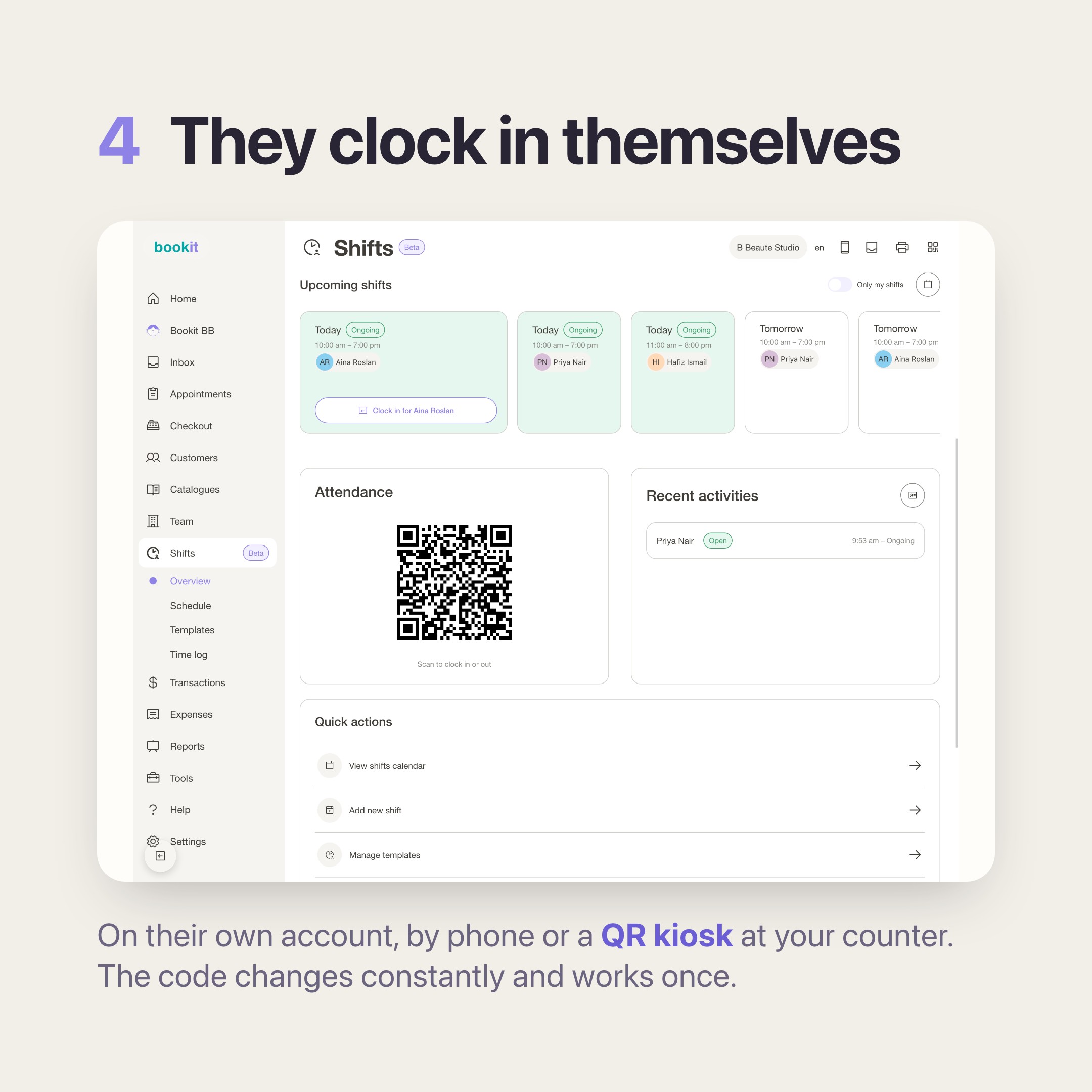
In bookit, your team clock in and out on their own account — from their own phone, or from a shared screen at the counter. You choose per branch how they prove they are actually there:
- QR kiosk — a code on a screen at your counter that changes constantly and works once. Screenshots are useless.
- GPS geofence — they clock in on their phone and must be within a distance you set of the branch. Save your branch address first, or there is nothing to measure against.
- Clock in anywhere — no location check at all. Honest about what it is; suits remote or trusted teams.
- Disabled — nobody clocks in, and you use the roster on its own.
That last one is where every branch starts, so setting the mode is the first thing to do — until you change it, your team see a card telling them attendance is switched off.
Once it is on, the clock-in lives on the first tile of their dashboard, so nobody has to go looking for it. Every clock-in is recorded against the person's own account, with the time and the method.
Not a shared PIN, not a name on a sheet — their account. That is what makes it worth anything four weeks later.
4. At month end, read the number instead of rebuilding it
This is the payoff, and it is the only reason to do the first three.
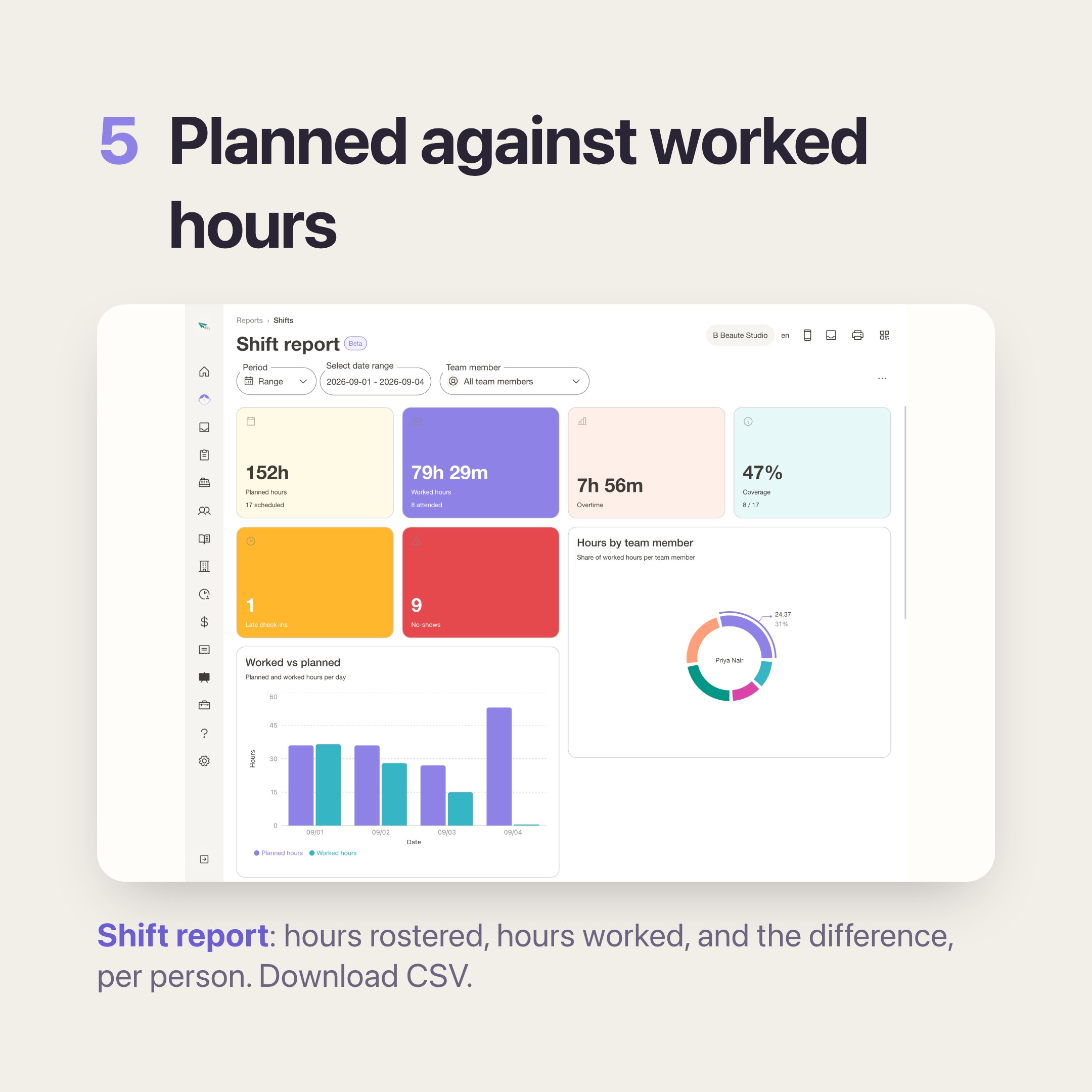
Reports, then Shift report, over any date range: the hours each person was planned for, the hours they actually worked, and the difference. Coverage across the period. Punches that were not covered by any shift. Clock-ins nobody closed. Filter to one person when someone queries their number, and download CSV for whoever does your payroll.
The argument does not become easier to win. It stops happening, because there is something to look at.
What it will not do
Worth saying plainly, because the gap between what people assume and what a tool does is where disappointment comes from.
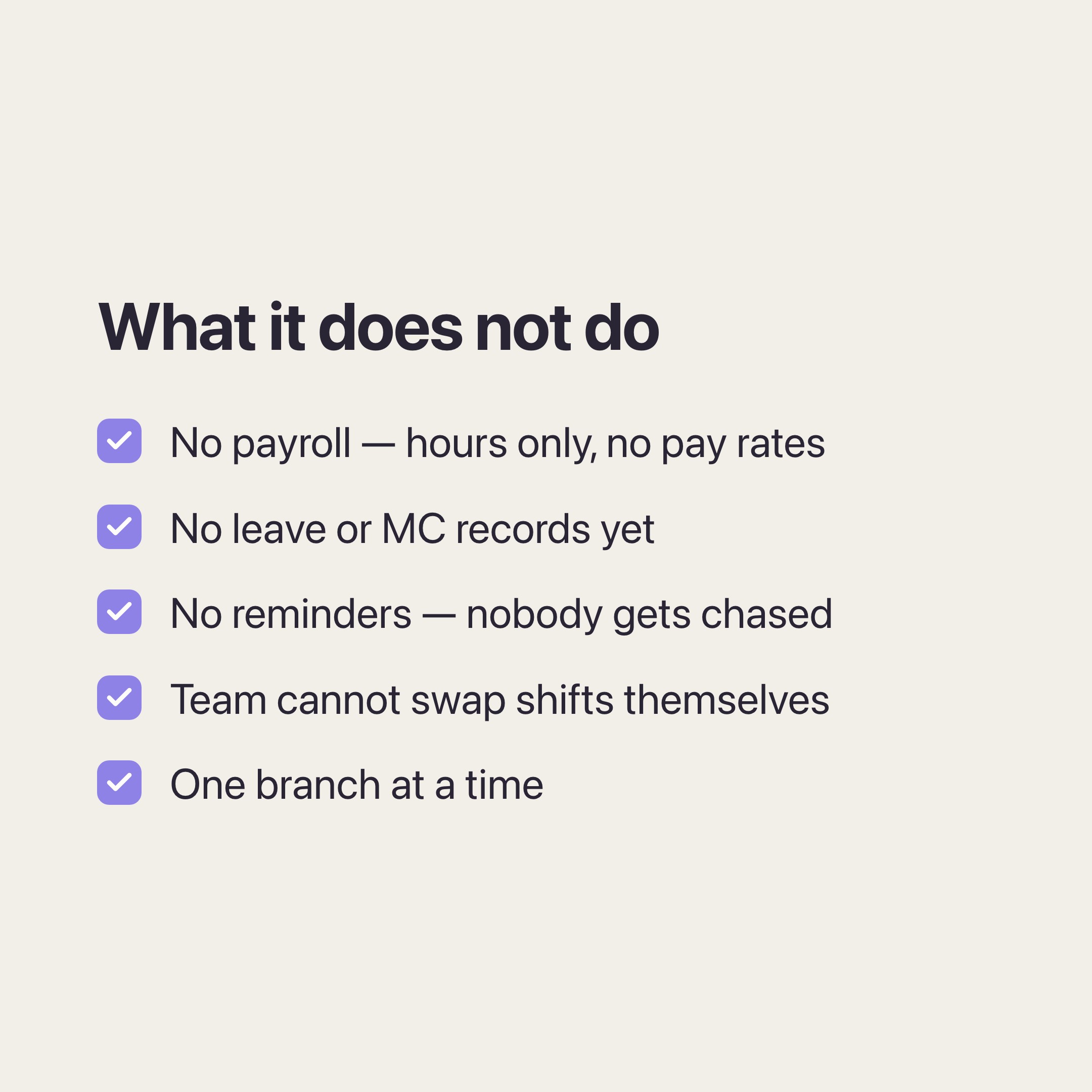
It does not do payroll. There is no pay rate field anywhere in bookit, on purpose. You get hours. Turning hours into wages is still someone else's job, which is why the CSV export exists.
It does not track leave. There is no MC or annual leave record yet. If someone is off, you cancel the shift.
It does not remind anyone of anything. Nobody gets a message about tomorrow's shift, and nobody gets chased for forgetting to clock out. You will see open clock-ins on the overview, but bookit will not tell anyone about them. If you are hoping to stop chasing people, this does not do that.
Your team cannot swap shifts between themselves. You can leave a shift unassigned as an open shift, but only a manager assigns it. Nobody claims one.
It is one branch at a time. Schedule, time log and report are all branch-scoped. There is no view that adds two branches together.
If those are the things you needed, this is not the tool yet, and we would rather you knew now.
What it costs and how to switch it on
Shifts is an optional add-on rather than part of the base plan. It is RM12 per month, per branch on Basic, Advance and Team, or RM100 per year, per branch on an annual cycle. You can see it on our pricing page alongside the other add-ons.
You do not need to ask anyone. Open the subscription page in your bookit account, add Shifts to the branch you want it on, and it is available on that branch straight away. Take it off the same way if it is not for you.
You will see a beta badge on it in the app. That is deliberate — it is new, we are still adding to it, and the merchants using it now are the ones shaping what comes next.
If leave records or shift swaps are what you are waiting for, tell us and it moves up the list.
Not sure it fits your shop? Talk to us on WhatsApp — takes 5 minutes, and we will tell you honestly if the answer is no.